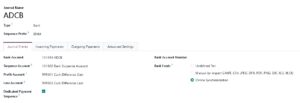
Create a Bank Journal (Most Common Requirement)
If you want the bank to appear in Accounting → Dashboard, you need a Bank Journal.
Steps:
Go to Accounting
Navigate to:
Configuration → JournalsClick Create
Set:
Journal Name (e.g., Emirates NBD – Main)
Type → Bank
Bank Account → select the bank account else create new bank GL for bank a/c (secondary)
Short Code (e.g., ENBD)
Under Accounting Information:
Set Default Debit Account (Bank GL)
Set Default Credit Account
- Set Default suspense Account
- Set outstanding receipt account for incoming payment (Manual Payment)
- Set outstanding payment account for outgoing payment (Manual Payment & check)
- Set bank feed
Click Save
✔ The bank will now show on the Accounting Dashboard
(Optional) Create Bank GL Account Manually
If not auto-created:
Go to Accounting → Configuration → Chart of Accounts
Click Create
Set:
Account Name: Bank – Emirates NBD
Account Type: Bank and Cash
Save and link it to the Bank Journal
UAE-Specific Best Practices 🇦🇪
Since you’re working with ERP in the UAE:
✔ Use IBAN format
✔ Assign AED currency
✔ Ensure proper bank GL mapping for VAT reconciliation
✔ Enable Bank Reconciliation from journal settings
✔ If using e-invoicing / PEPPOL, ensure bank details appear on invoices