Creating Assets Automatically from Vendor Bills
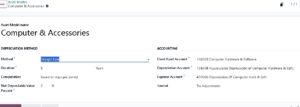
Create Asset Model (Very Important)
Asset Model define how depreciation works.
Configuration Path
Accounting → Configuration → Assets → Asset Model
Key Settings
Asset Type
Fixed Asset
Current Asset
Depreciation Method
Straight Line (most common)
Declining Balance
- Declining then straight-line
Duration
Number of years or number of depreciations
Depreciation Frequency
Monthly / Yearly
Accounts (Chart of Accounts)
Asset Account -GL
Depreciation Account -GL
Accumulated Depreciation -GL
Expense Account -GL
- Asset journal
Step 1: Create Vendor Bill
Accounting → Vendors → Bills
Select asset product (Type service)
- Set Asset GL as per the Asset Model
Validate bill
➡️ Odoo automatically creates the asset and links it to the bill.
Manual Asset Creation (If Needed)
Path:
Accounting → Accounting → Assets → Create
Fill:
Asset Name
Asset Category
Original Value
Start Date
Salvage Value (if any)
Click Confirm
Depreciation Management
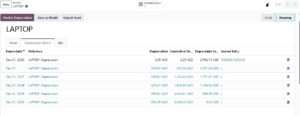
Automatic Depreciation
Odoo generates a depreciation schedule
Each period creates a draft journal entry
You can:
Post manually
Or automate posting
Accounting Impact
Debit: Depreciation Expense
Credit: Accumulated Depreciation